
The short answer
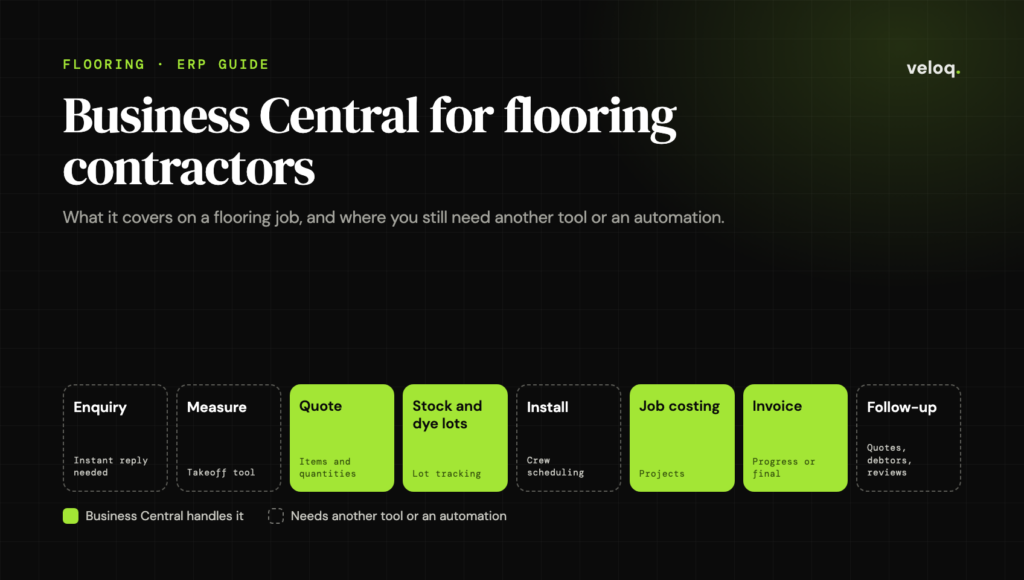
Microsoft Dynamics 365 Business Central can run a flooring contractor’s back office well: purchasing, stock tracked by dye lot, job costing and invoicing, from AU$119.70 per full user per month (Essentials, paid yearly, excluding GST). It is not flooring software, so measuring, takeoffs, installer scheduling and customer follow-up need another tool or automations built on top. It makes sense once you have several office staff, a warehouse and many jobs running at once. A small residential crew is usually better off with simpler software.
If you run a growing flooring installation business, someone has probably suggested Microsoft Dynamics 365. Maybe your accountant wants proper job costing, a builder you work for runs it, or your spreadsheets and accounting software can no longer tell you which jobs actually make money.
This guide is for flooring contractors weighing that move. It covers what Business Central does well for flooring work, where it falls short, what it costs in Australia, and how to fill the gaps without buying three more systems. Product details come from Microsoft’s own documentation and pricing pages, linked at the end.
Dynamics 365 or Business Central: which one do you mean?
Dynamics 365 is Microsoft’s family of business apps, not a single product. The member built for small and mid-sized businesses is Business Central: accounting, sales, purchasing, inventory, warehousing and project costing in one system. Other members, such as Dynamics 365 Sales and Dynamics 365 Field Service, are separate apps with their own licences that can connect to Business Central.
So when a flooring contractor says “we’re looking at Dynamics 365”, they almost always mean Business Central, and that is what this guide covers.
What Business Central does well for flooring contractors
Stock bought by the carton, sold by the square metre
Flooring is bought in cartons, pallets or rolls and quoted in square metres or linear metres. Business Central handles this with units of measure. Each item has a base unit, and you add other units with a conversion, for example a carton that holds 2.2 square metres of a hybrid plank. Microsoft’s documentation also recommends setting a rounding precision, so that splitting a carton does not leave quantities like 4.99998 on the shelf.
Decide your units before you load opening stock. Changing an item’s base unit after stock has moved through it is difficult, and fixing it later usually means a clean-up project.
Dye lots and batches
Tiles, carpet and many timber and hybrid products vary between production runs, which is why installers check the batch before they lay a single board. Lot tracking is built into Business Central. You can record the supplier’s batch number when stock arrives, choose the exact lot on a sales order so it carries through to the warehouse pick, and get a warning before the same lot is promised to two jobs. A lot can be blocked if a batch turns out to be faulty, and the mobile app can scan lot barcodes.
In practice, the warehouse sends one batch to each job, and when a customer calls two years later about a damaged board, you can see which batch went to their house and whether you have any left.
Job costing that shows which jobs make money
The Projects area (older versions call it Jobs) lets you set up each job or contract with a budget, schedule people against it, record labour, materials and subcontractor costs, and compare budget with actual. You can invoice when the job finishes or on an invoicing schedule, which suits staged commercial work, and work-in-progress calculations keep the books right for jobs that run across month end.
For many contractors this is the real reason to move. Accounting software tells you whether the business made money last quarter. Project costing tells you which builder, which product and which crew made it.
Purchasing linked to jobs
Materials can be ordered against a specific project, so supplier costs land on the right job instead of a general materials account that nobody can untangle at the end of the year.
Office, warehouse and phone on one system
Quotes, orders, stock, purchasing, invoices and the general ledger share one database, and staff can use the Business Central mobile app on a phone or tablet. Both paid plans include project management, inventory and warehouse management. The Premium plan adds service order management and manufacturing.
Where Business Central falls short for flooring work
Business Central is a general business system. Flooring contractors tend to hit the same four gaps.
Measuring, takeoffs and flooring quotes
There is no floor plan drawing, room measuring, cut planning or waste calculation. A quote in Business Central is a list of items and quantities. Most contractors keep a takeoff or flooring estimating tool for the measure and either retype the result into Business Central or connect the two.
Offcuts and roll remnants
Lot tracking tells you how many metres are left on a roll. It does not know whether that is one usable 3 by 4 metre piece or three narrow strips. Remnants need a naming rule, a separate remnant item, or a small extension if you sell a lot of them.
Installer scheduling
Business Central has resources, capacity and time sheets, but no dispatch board for sending crews to sites. Microsoft’s answer is Dynamics 365 Field Service, a separate app that connects to Business Central: work orders and bookings are managed in Field Service, and completed work flows back to Business Central to be invoiced. Microsoft notes that service management features are not available in the Essentials plan, so check with your partner which licences that setup needs. Many contractors keep a simpler scheduling app instead.
Lead follow-up and customer updates
Business Central stores contacts, opportunities and sales quotes. It does not reply to a website enquiry within a minute, text a customer the day before their measure, or chase an unanswered quote on day three. Those are the steps that win or lose work, and they need Dynamics 365 Sales, a separate CRM, or automations built on top of Business Central.
What Business Central costs in Australia
Microsoft lists Business Central per named user per month, paid yearly. Prices on Microsoft’s Australian page exclude GST.
| Plan | Australia (ex GST) | United States | Who it suits |
|---|---|---|---|
| Essentials | AU$119.70 | US$80 | Office staff who quote, buy, invoice and run projects |
| Premium | AU$164.60 | US$110 | Everything in Essentials, plus service orders and manufacturing |
| Team Members | AU$12 | US$8 | Staff who mainly look things up and approve (check Microsoft’s licensing guide for what they can change) |
A contractor with five office users on Essentials pays about AU$7,182 a year in licences before GST (5 × AU$119.70 × 12). On top of that is implementation. Business Central is bought and set up through Microsoft partners, and setup cost depends on data migration, reports and extensions, so get a fixed scope in writing before you sign.
Is Business Central the right fit? A quick test
Business Central tends to pay off when most of these are true:
- You hold stock in a warehouse and need to know which batch went to which job.
- You run many jobs at once, including commercial contracts with staged invoicing.
- Several office staff enter quotes, orders and supplier invoices every day.
- Your accountant wants profit by job and proper month-end work in progress.
- You have, or expect to have, more than one company or branch.
If you are a three-person crew doing residential installs from supplier stock, it is probably too much system. Accounting software such as Xero or MYOB with a job app such as ServiceM8 or Tradify, or flooring-specific software such as RFMS or QFloors, will be cheaper and quicker to run.
How to fill the gaps without replacing Business Central
You do not need a second system for every gap. Business Central comes with a licence for Microsoft Power Automate and a connector for it, and its REST API is switched on by default for online customers, so other tools and automations can read and write customers, quotes, orders and invoices. These are the automations that usually pay back first for a flooring business:
- Instant replies to new enquiriesA website or Facebook enquiry creates the contact in Business Central and gets a personal reply within a minute, with a link to book a measure.
- Quote follow-up on a scheduleWhen a quote goes out, the customer hears from you on day 2, day 5 and day 10 unless they accept first. Our 14-day estimate follow-up sequence has example wording.
- Measure and install remindersCustomers get a text the day before, and the crew gets the job details and lot number on their phone.
- Debtor chasingOverdue invoices trigger polite reminders on a set schedule, and the office only sees the accounts that need a call.
- Supplier invoice entrySupplier invoices that arrive as PDFs are read and drafted in Business Central for someone to check, instead of typed in line by line.
- Review requestsWhen a job is marked complete, the customer gets a request for a Google review while the floor still looks new.
This is the work we do at Veloq. We connect automations to the system a business already runs, so the office stops retyping. We do not sell Business Central licences or implement the ERP itself; a Microsoft partner does that. Here is what changed when we did this inside one flooring store’s existing CRM:
What changed at a Choices Flooring store in Mackay
One independent store in the Choices Flooring network, Mackay, Queensland. Ava, a Veloq digital employee, works inside the store’s existing CRM and staff approve anything sensitive over WhatsApp.
Figures from Veloq’s case study with Choices Flooring Mackay. Results from one store; yours will depend on volume and process.
Five setup decisions to get right for flooring
- Choose the base unit for each productSquare metres for most hard flooring and tiles, linear metres for roll goods, with cartons and pallets as extra units. Set the rounding precision at the same time.
- Turn on lot tracking for anything with batchesUse an item tracking setup that asks for a lot number when stock is received and when it is sold, so nothing leaves the warehouse without a batch recorded.
- Decide what a project isOne project per residential job, or one per builder contract with a task for each site. Pick one rule and keep it, so reports compare like with like.
- Set up installers as resourcesGive each installer or crew a cost and a charge rate so labour shows correctly in job profit. Subcontract installers can be charged to the project through purchase invoices.
- Write down what stays outside Business CentralMeasuring, scheduling and customer messages usually live elsewhere. Decide which system owns each record and how data moves before go-live, so nobody types the same job twice. Our guide to flooring software integration walks through this.
Business Central for flooring contractors: FAQs
Is Dynamics 365 the same as Business Central?
Business Central is part of Microsoft’s Dynamics 365 family. It is the member designed for small and mid-sized businesses, covering finance, sales, purchasing, inventory and projects. Dynamics 365 Sales, Field Service and the other apps are licensed separately.
How much does Business Central cost in Australia?
Microsoft lists Essentials at AU$119.70 and Premium at AU$164.60 per user per month, paid yearly and excluding GST, with Team Members at AU$12. Setup by a Microsoft partner is extra.
Can Business Central track dye lots?
Yes. Lot tracking is standard. You can record the supplier’s batch on arrival, pick specific lots for each order, block a faulty batch and trace which lot went to which customer.
Can Business Central schedule flooring installers?
It can plan resources and record time, but it has no dispatch board. Microsoft connects it to Dynamics 365 Field Service for that, or you can use a separate scheduling app and connect it.
Can Business Central work with our flooring software and other tools?
Usually, yes. Business Central has a REST API and a Power Automate connector. Whether a direct link exists depends on the other tool, so check what your flooring or estimating software can export or connect to before you commit.
Do we need a Microsoft partner?
In practice, yes. Microsoft directs buyers to partners to purchase and set up Business Central. Ask for a fixed-scope quote that covers data migration, units of measure, lot tracking and project setup.
The bottom line
Business Central is a strong back office for a flooring contractor that has outgrown accounting software: stock by dye lot, purchasing against jobs and real job costing. It is not flooring software, and it will not follow up a customer on its own. Budget for a partner to set it up, keep a measuring tool, and automate the customer-facing steps around it, because that is where jobs are won or lost.
If you want help connecting quoting, follow-up and debtor chasing to Business Central or whatever system you run, see our AI automation services or book a free strategy call.
Read next: Flooring Software Integration: Stop Typing Everything Twice and How Flooring Contractors Get Paid Faster (Without Awkward Calls).
7-Day Workflow Build · 8 new stores a month
Your busiest workflow, live in 7 days.
We build it on the tools you already use. You keep running the store.
- Your #1 workflow automated: quote follow-up, debtor chasing, payment matching or lead replies
- Custom CRM pipeline: enquiry → measure → quote → won → installed → paid
- Missed-call text-back, so no caller hits voicemail
- Automatic Google review requests after every install
- Owner dashboard: open quotes, follow-ups due, money owed
- Team training and 30 days of tuning after go-live
- Live in 7 days or you don’t pay*
- Saves 5+ hours a week within 30 days, or we keep working free until it does*
*Guarantees apply when we receive your logins and details within 48 hours of kickoff. More automations and ongoing support are quoted separately.
Sources
- Microsoft, Dynamics 365 Business Central pricing (Australia)
- Microsoft, Dynamics 365 Business Central pricing (United States)
- Microsoft Learn, Set up units of measure
- Microsoft Learn, Track items with serial, lot and package numbers
- Microsoft Learn, Managing projects
- Microsoft Learn, Integrate with Dynamics 365 Field Service
- Microsoft Learn, Use Business Central in Power Automate flows
- Microsoft Learn, Business Central API v2.0
- Microsoft Learn, Get Business Central on your mobile device
- Veloq, Choices Flooring case study

Meesam builds AI automations for flooring stores and contractors at Veloq, the engineer-led AI software house. He works hands-on with flooring businesses like Choices Flooring in Mackay, Queensland, automating quoting, lead follow-up, debtor chasing and payment matching inside the tools they already use. His guides draw on that client work and on current flooring industry research.


